
























CMS
We design and implement CMS systems that let teams manage website content on their own — without involving a developer for every change. We choose the technology to fit the project and the way your editorial team works. We mainly implement headless CMS solutions, including Strapi, and help migrate from existing systems.
Companies that trusted us
The basics
Why a company needs a CMS, and how headless differs from traditional
A good CMS should, above all, make everyday work with content easier. An editor should be able to add a page, update the offer, publish an article or change an image without help from the technical team. A traditional CMS (WordPress) keeps content and design together — the editor sees the page as it will look. A headless CMS (Strapi, Contentful) separates the two: the system stores the content and serves it through an API, while a separate layer handles the design. The cost is no one-to-one preview without extra work. The benefit — the same content powers the website, the app and every new channel that comes along.
Headless wins when content needs to go to more than one place, when site speed matters and when you need custom content types with relationships between them. It loses on a simple brochure website — there, a traditional CMS is faster to implement and cheaper to maintain. We tell you this before quoting, not after.
See the CMS projects we delivered for clients
„The Boring Owl team has extensive SEO knowledge, and the front-end solutions were implemented in line with SEO best practices. The website works well and fast, and a big plus is that we rank well.”
Michał Rugiełło — E-Commerce Director, Kwant Hurtownie Elektryczne sp. z o.o.
Review from Clutch
How we work
What implementation looks like and what the editorial team gets
We start with the content model: which types (post, service, case study), which fields in each and what relationships between them. This stage looks technical, but it's really editorial — it determines what can be described later without adding fields. Then we build the panel, connect the presentation layer and migrate the content. Implementation ends with training: not just handing over a login, but working through the real tasks the editorial team will do every week.
On your side are naming the people who will work in the panel and deciding on permissions — who publishes and who only prepares content. On our side are the model, the panel, migration and training.
The timeline depends on the number of content types and the volume of material to migrate. Migration from a well-organized source is automatic; from a website where every post has a different structure, it requires manual cleanup, and that's usually the longest stage.
Decisions
Decisions that determine whether the editorial team will like the system
How many fields a content type should have. Every extra field is a decision the editor has to make with every entry. A model with forty fields "just in case" ends with thirty of them left empty and a form nobody can get through.
Whether you need a preview before publishing. In headless, this is extra work, not an out-of-the-box feature. If the editorial team publishes daily, it's worth including in the quote from the start; if once a month — probably not.
Who updates the system. A CMS is software with its own release cycle and security patches. Without a designated owner for updates, you end up with a two-year-old version with open vulnerabilities.
What not to do. Don't model content around how the website looks today — the design will change faster than the content. Don't give everyone admin rights. And don't migrate everything without a review; the chance to remove dead content won't come again.
Scope
A headless CMS with a panel built for editors
The standard implementation scope: content model, panel, presentation layer in Next.js, migration and training. Plus roles and permissions, language versions, integrations with the tools you already use, and maintenance after launch — version updates, backups and responding when something stops working.
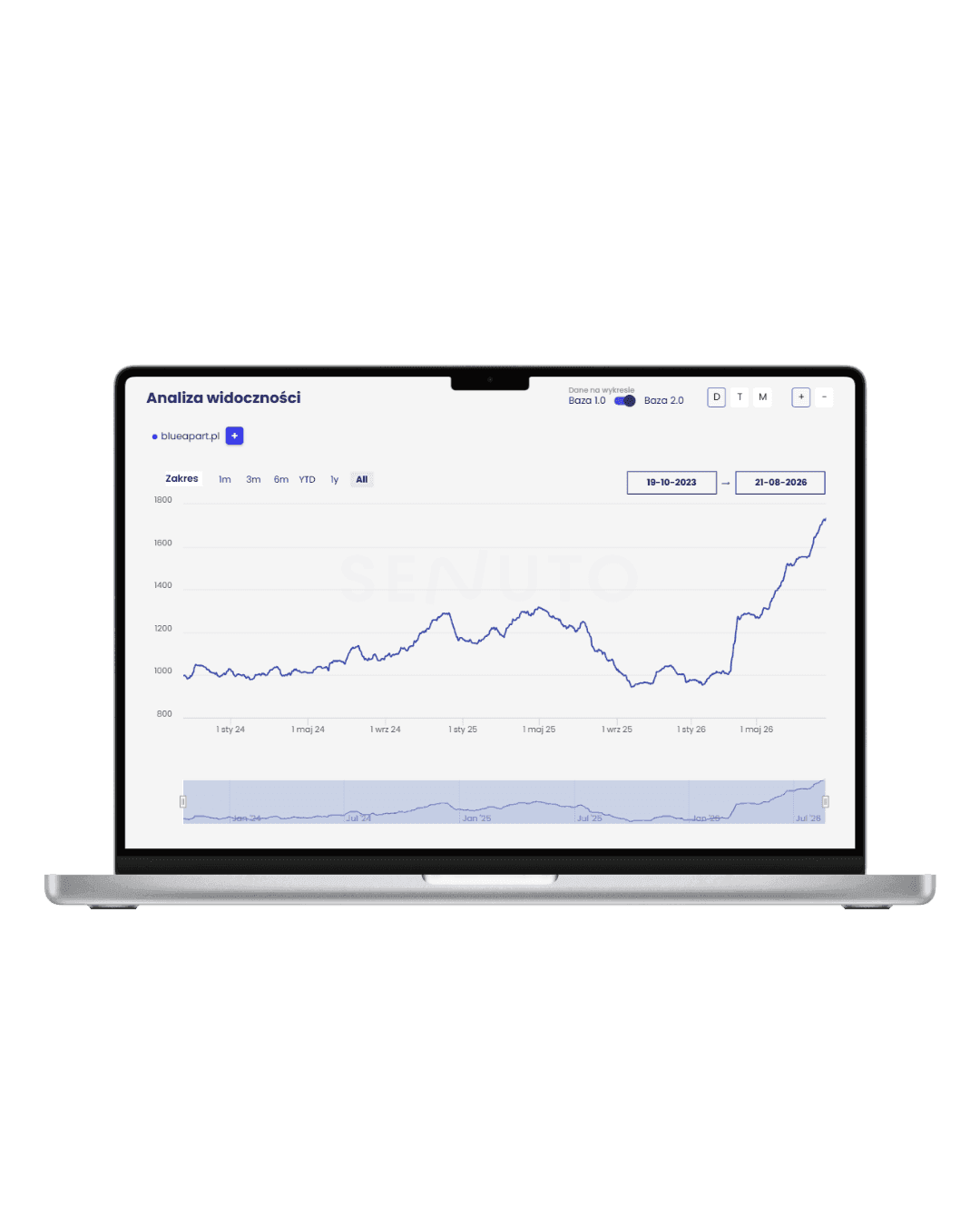
Migration from the old system is usually the biggest unknown in the project. We automate it with scripts that produce a diff report, so after the move you can check what made it into the new system and what's missing. We also keep a separate eye on search visibility: redirects from old URLs, duplicates cleaned up, technical subdomains blocked from indexing. When we migrated the BlueApart platform, the result was a twofold increase in organic visibility.
Content model
Content types that survive the next redesigns
Content separated from presentation is the promise of headless — provided the model has been designed sensibly: shared components, relationships instead of copies, fields named in the editorial team's language rather than the database's. Then a front-end redesign doesn't mean migrating content, and the same data powers the website, the app and integrations. On our own website, we've maintained a dozen or so content types this way for years, without rebuilding the schema.
Site performance doesn't depend on the load on the panel: statically generated pages withstand traffic spikes, and the editorial team works smoothly no matter how many users are on the site at the time.
Editorial work
Publishing without a developer, security without compromise
We set up the panel for people: roles and permissions, a draft — review — publish workflow, preview before publishing, and a media library that's sensibly organized. Plus automatic page refresh after publishing — content appears within seconds, without rebuilding the site or filing a ticket with IT. The Migration Consortium's editorial team runs its website entirely on its own; our role ended with implementation and training.
Security in headless starts with architecture: the panel doesn't sit in the same place as the website, and a statically generated front end has nothing to execute. The rest is routine — version updates, backups with restore tests and access reviews. We carry these out on a set schedule, not only when something happens.
Related services

Web Development
We design and build custom web applications - from an MVP that lets you quickly validate an idea to large platforms and systems developed over years. We build both the front end and the backend, APIs, databases, admin panels and integrations with external systems. We work with Next.js, React, Node.js, NestJS, Python, PostgreSQL and MongoDB, among others. We create solutions tailored to a specific business process: SaaS applications, internal systems, sales platforms, websites, marketplaces and CMS systems.
Learn moreUX/UI Design
We design UX/UI for web and mobile applications and B2B systems - from analyzing user needs and early wireframes to the finished interface and a design system in Figma. We don't design screens in isolation from the product. We look at user journeys, analytics data and technical constraints to create a solution that's easy to use and can be built efficiently. After the product launches, we can come back to heatmaps, session recordings, analytics and user interviews, so that the next changes are driven by data, not assumptions.
Learn moreFAQ
Questions we hear before a CMS implementation
- It depends mainly on the type of site, the number of people working with content and the plans for developing the service. For simple sites a traditional CMS is often enough. For complex services, integrations or multiple publishing channels, a headless CMS is worth considering. We choose the technology after analyzing the project's requirements.
- A headless CMS is a good choice when content needs to be used in multiple places, the service is going to be developed intensively, or custom integrations and data structures are needed. It gives more flexibility than a traditional CMS, but isn't necessary for every project.
- The cost depends on the project scope: the number of content types, panel features, integrations and the volume of data to be migrated. It also matters whether we're implementing the CMS into an existing site or building a new frontend alongside it.
- Yes. We analyze the structure of the existing system, prepare a migration plan and move the required content. If URLs are changing, we also handle redirects to reduce the risk of losing existing search visibility.
- Yes. The type of CMS alone doesn't guarantee high rankings, though. What matters most is the frontend, performance, page structure, URLs, metadata, internal linking and proper indexation. The CMS should make managing all of these straightforward.
- Yes. The panel is designed precisely so that everyday content changes do not require a developer. We agree on the scope of editing during the CMS design phase, and after launch we walk the team through the most important tasks.
- The CMS itself, with a content model and a set of sections, takes anywhere from a few to several weeks. The overall timeline is determined by the migration and the state of data in the old system. It's worth checking at the start how many of those several hundred pages actually need to carry over — often it turns out to be fewer than half.